Monday, December 8, 2014

なぜHTTPSはHTTPより速いのか

先週、httpvshttps.com というウェブサイトが公開されました。このウェブサイトでは、HTTP と HTTPS を用いてアクセスした場合のウェブページのダウンロード完了までにかかる時間の比較ができるのですが、多くの環境で HTTPS の方が HTTP よりも高速なことに驚きの声が上がっていました。

HTTP が TCP 上で平文を送受信するのに対し、HTTPS は TCP 上で TLS (SSL) という暗号化技術を用いて通信を行います。ならば、TLS のオーバーヘッドのぶん HTTPS のほうが遅いはずだ、という予測に反する結果になったのですから、驚くのも無理はありません。

実は、この結果にはからくりがありました。

Google Chrome、Mozilla Firefox、最近のSafari注1は、Google が開発した通信プロトコル「SPDY」に対応しており、HTTPS の通信においてはHTTP/1.1 ではなく SPDY を TLS 上の通信プロトコルとして利用します。

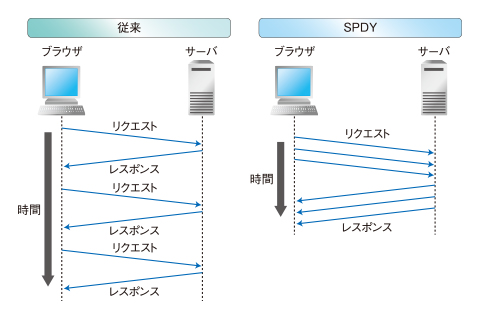
HTTP/1.1 は20年近く前に標準化された技術であり、今日では様々な限界が指摘されるようになってきています。そのうち最大の問題が、ウェブブラウザ上において、現在ダウンロード中のファイルのダウンロードが完了するまで次のファイルのダウンロード要求を送信できないという問題です。クライアントとサーバ間を通信が往復するには、数十ミリ秒から数百ミリ秒という時間がかかります(この時間は、ラウンドトリップタイム (RTT) と呼ばれます)。

ウェブブラウザが、第一のファイルのダウンロードを完了した直後に第二のファイルのダウンロード要求をサーバに送信したとしても、その中身が届き始めるのは、このラウンドトリップタイムが経過した後になります。その間、サーバからクライアント方向の通信回路は無駄に遊んでいることになります。

httpvshttps.com のような、小さな画像ファイルを多数ダウンロードするウェブページでは(これは多くのウェブサイトに見られる一般的な特徴です)、この無駄が占める割合が大きくなるのです(ウェブブラウザの動作としては、リクエストを送信後、RTTが経過するまでじっと待ち、その後一瞬でファイル受信が完了、直後に次のリクエストを送信し、RTT が経過するまでじっと待つ…を繰り返す形になります)。

一方、SPDY はこれら HTTP/1.1 が抱える問題を改善しようとする Google の試みとして開発が進んできたプロトコルであり、多数のファイルを並行してダウンロードすることが可能となっています。HTTP/1.1 のように、ファイルの到着を待つだけの時間は発生しません。

この違いが、暗号化のオーバーヘッドがあるにも関わらず、HTTPS のウェブページの方が HTTP より速くダウンロードが完了することの原因なのです。

■この傾向は今後も続くのか

SPDY は Google が開発した実証実験的な性格の強いプロトコルでした。そこから得られた成果をもとに、現在、HTTP/2 という次世代の HTTP プロトコルの標準化が進められており、はやければあと数週間で標準化される見込みとなっています。

HTTP/2 プロトコルの標準化案自体は HTTP でのアクセスにおいても HTTPS でのアクセスにおいても利用可能なものとなっています。ですが、多くのウェブブラウザはHTTPS でのアクセスにおいてのみ、HTTP/2 を有効化する公算が高くなっています注2

このため、HTTPS の方が HTTP よりも高速である、という状況は今後とも続くと考えられます。

■HTTPS のサーバ負荷はどうなのか

HTTPS に対する事業者の不安としては、ダウンロード速度に加えてもう一点、サーバ負荷の問題をあげることができます。暗号化を導入することで、サーバの負荷が増大するのではないか。

筆者らが開発している、高速なHTTPサーバであるH2Oでは…(続く)

本記事は HTTP2 Advent Calendar 2014 および H2O Advent Calendar 2014 の一部です。筆者体調不良により遅延&書きかけの状態ですみませんすみません。

注1: YosemiteまたはiOS 8上で動作するものに限る
注2: 参照: (HTTP/2標準化ワークグループ座長のブログ記事, https://wiki.mozilla.org/Networking/http2

Monday, December 1, 2014

Improving Parser Performance using SSE Instructions (in case of PicoHTTPParser)

PicoHTTPParser is a tiny but very fast HTTP parser library known for its use by many Perl applications. In the slides I used last month, I suggested it could be even faster if SIMD instructions were used. Now the feature is available thanks to @herumi.

The library now uses the PCMPESTRI instruction which is part of SSE 4.2, running 68% to 90% faster.

Benchmarkclang -O3clang -O3 -msse4.2Improvement
bench.c2,181,0254,140,787+90%
fukamachi.c3,213,4405,400,064+68%

PCMPxSTRx is a SIMD instruction that can be used for parsing text. In _SIDD_CMP_RANGES mode, it checks at most 16 bytes at once, if each byte is within given set of ranges. Herumi and I have created a wrapper function for the instruction named findchar_fast that iterates though every 16 bytes of a given buffer to find the first occurrence of a byte within a set of given ranges.

And the function is merged neatly into the parser; the code below at first uses the SIMD function to look for a control character (the match condition is defined as ranges1), then falls back to the non-SIMD code to handling up to 15 remaining characters (that cannot be processed by the SIMD function due to out-of-bounds access).
#ifdef __SSE4_2__
  static const char ranges1[] =
    "\0\010"
    /* allow HT */
    "\012\037"
    /* allow SP and up to but not including DEL */
    "\177\177"
    /* allow chars w. MSB set */
    ;
  int found;
  buf = findchar_fast(buf, buf_end,
                      ranges1, sizeof(ranges1) - 1,
                      &found);
  if (found)
    goto FOUND_CTL;
#endif
  /* code that handles the input byte-by-byte */
To summarize, PCMPxSTRx is an excellent instruction for performance that can be cleanly integrated into existing parsers (tokenizers). Hopefully we will see performance improvements in various parsers in the future through the use of the instruction.

This blog post has been written as part of the H2O Advent Calendar.

Wednesday, November 5, 2014

[memo] Installing nghttp2 onto OSX

Following the steps below should install nghttp2 with all of its useful apps for testing into /usr/local/http2-15 of your OS X machine.

-- openssl
% wget --no-check-certificate https://www.openssl.org/source/openssl-1.0.2-beta3.tar.gz
% tar xzf openssl-1.0.2-beta3.tar.gz
% cd openssl-1.0.2-beta3
% KERNEL_BITS=64 ./config shared enable-ec_nistp_64_gcc_128 --prefix=/usr/local/http2-15
% make
% make install

-- libevent
% wget https://github.com/downloads/libevent/libevent/libevent-2.0.21-stable.tar.gz
% CFLAGS=-I/usr/local/http2-15/include CXXFLAGS=-I/usr/local/http2-15/include LDFLAGS=-L/usr/local/http2-15/lib ./configure --prefix=/usr/local/http2-15
% make
% make install

-- zlib-1.2.8
% wget http://zlib.net/zlib-1.2.8.tar.gz
% tar xzf zlib-1.2.8.tar.gz
% cd zlib-1.2.8
% ./configure --prefix=/usr/local/http2-15
% make
% make install

--  spdylay
% git clone https://github.com/tatsuhiro-t/spdylay.git
% cd spdylay
% (cd m4 && wget http://keithr.org/eric/src/whoisserver-nightly/m4/am_path_xml2.m4)
% autoreconf -i
% PKG_CONFIG_PATH=/usr/local/http2-15/lib/pkgconfig ./configure --prefix=/usr/local/http-15
% make
% make install

-- nghttp2
% git clone https://github.com/tatsuhiro-t/nghttp2.git
% cd nghttp2
% (cd m4 && wget http://keithr.org/eric/src/whoisserver-nightly/m4/am_path_xml2.m4)
% autoreconf -i
% PKG_CONFIG_PATH=/usr/local/http2-15/lib/pkgconfig ./configure --prefix=/usr/local/http2-15 --enable-app --disable-threads
% make
% make install

note: I have gathered this from my command history. Please forgive me if any of them are wrong.
EDIT: added libevent as pointed out by @tatsuhiro-t.

Tuesday, November 4, 2014

The internals H2O (or how to write a fast server)

Yesterday, I had the opportunity to speak at the HTTP2Conference held in Tokyo.

Until now, I have rather been silent about H2O since I think it is still premature for wild use. But you do not need to worry about such thing in a technology conference, so I happily talked about the motives behind H2O, and its implementation.

IMO the talk should be interesting not only to people working with HTTP server implementations but also to those interested in programming in general, since it covers the common performance pitfalls (or misconceptions as I see) in many server implementations.

Below are the slides and the recorded video of my presentation.

Enjoy!

PS. Please forgive me for the provocative attitude in the questions raised in the last part of the slides. They were intentionally written as such in order to spark discussion at the hall.


my talk starts a 3h15m (in Japanese)

Related links:

Friday, October 10, 2014

[メモ] root権限でrsyncする方法

サーバの移転作業時など、rootしかアクセスできない設定ファイルやアクセス権を保ったままrsyncしたいことってありませんか?

そういった際には、sudo の -A オプションと rsync の --rsync-path オプションを使うと良いようです。

まず、リモートサーバに、パスワードを標準出力に出力するスクリプトファイルを配置します(ファイルのパーミッションを厳しくするのを忘れずに)。
% cat > bin/askpass
#! /bin/sh
echo "{{my_password}}"
% chmod 700 bin/askpass
% 
そして、rsync を実行する際には --rsync-path オプションを使い、リモートサーバの rsync を sudo -A 経由で起動するようにすれば良いのです。
% sudo rsync -avz -e ssh \
    --rsync-path='SUDO_ASKPASS=/home/remote-user/bin/askpass sudo -A rsync' \
    remote-user@remote-host:remote-dir local-dir

これは簡単!

sudo -Aオプションはパスワードを記述したファイルを設置する必要があるという点でNOPASSWD同様セキュリティの懸念はありますが、使いどころを誤らなければ便利だなと思いました。

Tuesday, October 7, 2014

Making the HTTP server run 20% faster by using qrintf-gcc; a sprintf-optimizing preprocessor / compiler

tl;dr

This is an initial release announcement of qrintf, a preprocessor (and qrintf-gcc is the compiler frontend) that optimizes calls to sprintf and snprintf. C programs calling the functions may run faster by using the preprocessor / compiler in place of the standard compiler toolchain.

github.com/kazuho/qrintf

Background

sprintf (snprintf) is a great function for converting data to strings. The downside is that it is slow. Recently the functions have been one of the bottlenecks of H2O, which is a high performance HTTP server / library with support for HTTP/1.x and HTTP/2.

The function is slow not because stringification in general is a slow operation. It is slow mainly due to its design.

The function takes a format string (e.g. "my name is %s") and parse it at runtime, every time the function gets called. The design must have been a good choice when the C programming language was designed. Until the 1990s, every byte of memory was a precious resource. Using a memory-conscious approach (e.g. a state-machine for formatting strings) was a logical choice. But nowadays, the cost of memory is hundreds-of-thousand times cheaper than it used to be. On the other hand, the relative cost of running a state machine for building formatted strings has become large since it causes lots of branch mis-predictions that stall the CPU pipeline.

How it works

The understanding has led me to write qrintf, which works as a wrapper against the C preprocessor. It precompiles invocations of sprintf (and snprintf) with a constant format string (which is mostly the case) into optimized forms.

The example below illustrates the conversion performed by the qrintf preprocessor. As can be seen, the call to sprintf is precomplied into a series of function calls specialized for each portion of the format (and the C compiler may inline-expand the specialized calls). In the case of the example, the optimized code runs more than 10 times faster than the original form.
// source code
snprintf(
    buf,
    sizeof(buf),
    "%u.%u.%u.%u",
    sizeof(buf),
    (addr >> 24) & 0xff,
    (addr >> 16) & 0xff,
    (addr >> 8) & 0xff,
    addr & 0xff);

// after preprocessed by qrintf
_qrintf_chk_finalize(
    _qrintf_chk_u(
        _qrintf_chk_c(
            _qrintf_chk_u(
                _qrintf_chk_c(
                    _qrintf_chk_u(
                        _qrintf_chk_c(
                            _qrintf_chk_u(
                                _qrintf_chk_init(buf, sizeof(buf)),
                                (addr >> 24) & 0xff),
                            '.'),
                        (addr >> 16) & 0xff),
                    '.'),
                (addr >> 8) & 0xff),
            '.'),
        addr & 0xff));
$ gcc -Wall -O2 examples/ipv4addr.c && time ./a.out 1234567890
result: 73.150.2.210

real 0m2.475s
user 0m2.470s
sys 0m0.002s
$ qrintf-gcc -Wall -O2 examples/ipv4addr.c && time ./a.out 1234567890
result: 73.150.2.210

real 0m0.215s
user 0m0.211s
sys 0m0.002s

Performance impact on H2O

H2O uses sprintf in three parts: building the HTTP status line, building ETag, and building the access log.

By using qrintf-gcc in place of gcc, the performance of H2O jumps up by 20% in a benchmark that sends tiny files and with access logging enabled (from 82,900 reqs/sec. to 99,200 reqs/sec.).

The fact not only makes my happy (as the developer of qrintf and H2O) but also shows that optimizing sprintf at compile-time do have benefit for real world programs.

So if you are interested in using qrintf or H2O, please give it a try. Thank you for reading.

Thursday, October 2, 2014

sprintf を最大10倍以上高速化するプリプロセッサ「qrintf」を作った

最近H2OというHTTPサーバを書いているのですが、プロファイルを取ってみるとsprintfが結構な時間を食っていて不満に感じていました。実際、sprintfは数値や文字列をフォーマットするのに十徳ナイフ的に便利なので、HTTPサーバに限らず良く使われる(そしてCPU時間を消費しがちな)関数です。

では、sprintfを最適化すれば、様々なプログラムが より高速に動作するようになるのではないでしょうか。ということで作ったのが、qrintfです。

qrintfは、Cプリプロセッサのラッパーとしてソースコードに含まれるsprintfの呼出フォーマットを解析し、フォーマットにあわせたコードに書き換えることで、sprintfを高速化します。

たとえば、以下のようなIPv4アドレスを文字列化するコード片を
sprintf(
    buf,
    "%d.%d.%d.%d",
    (addr >> 24) & 0xff,
    (addr >> 16) & 0xff,
    (addr >> 8) & 0xff,
    addr & 0xff);
以下のようにコンパイル時に自動的に書き換え、実行時にフォーマット文字列の解析する負荷を省くことで大幅な高速化を実現しています。
((int)(_qrintf_d(
    _qrintf_c(
        _qrintf_d(
            _qrintf_c(
                _qrintf_d(
                    _qrintf_c(
                        _qrintf_d(
                            _qrintf_init(buf),
                            (addr >> 24) & 0xff),
                        '.'),
                    (addr >> 16) & 0xff),
                '.'),
            (addr >> 8) & 0xff),
        '.'),
    addr & 0xff)
).off);

たとえば上記のコードの場合、以下のように、qrintfを用いることで10倍以上文字列化処理が高速化することを確認しています。
$ gcc -O2 examples/ipv4addr.c
$ time ./a.out 1234567890
result: 73.150.2.210

real    0m2.602s
user    0m2.598s
sys 0m0.003s
$ ./qrintf-gcc -O2 examples/ipv4addr.c
$ time ./a.out 1234567890
result: 73.150.2.210

real    0m0.196s
user    0m0.192s
sys 0m0.003s

sprintfを呼んでいるコードを書き換えずに高速化できて、ハッピーですね!